 Bondi
kernel_task high CPU on Mac? Your Mac is cooling itself down
Add Bondi as a preferred source on GoogleOn this page
When kernel_task shows a high CPU figure, your Mac is almost always running hot, or close to overheating. macOS is taking CPU time on purpose so that apps slow down and the heat drops. It's a safety feature, not a bug or malware.
Key points
- High kernel_task CPU usually means the Mac is hot: macOS slows apps on purpose to cool it.
- It's a safety feature. You can't quit kernel_task, and you wouldn't want to.
- Cool the Mac instead: find the app heating it, use a hard surface, and unplug if it's warm and charged.
What kernel_task is on a Mac
kernel_task is the core of macOS: the part that manages memory, hardware and every other process. You can't quit it, and you wouldn't want to.
The confusing part is its CPU figure. Besides its normal work, kernel_task's number also includes time macOS deliberately sets aside to cool the Mac. When the chip gets hot, macOS gives that time to kernel_task instead of your apps, which keeps them from making the chip any hotter. So a big kernel_task number is a symptom of heat, not its cause.
Normally it's quiet. On the Mac I measure on, kernel_task was using 1.0% of the CPU in an ordinary moment. Its memory figure is also large on most Macs, and that's normal too.
Why your Mac is getting hot
The common reasons:
- Charging in a warm room. Charging adds heat, and a warm room leaves less headroom.
- A soft surface. A bed, sofa or lap blocks airflow under the Mac.
- Sustained heavy work. Video export, compiling, games, or a browser tab running something heavy.
- One app stuck in a loop. An app or helper process using 100% of a core for no good reason.
- External displays. Driving several or very high-resolution displays adds steady load.
What actually helps
- Find the app heating it. In Activity Monitor's CPU tab, sort by % CPU. Ignore kernel_task itself and look at what's next. If one app is high while you're not using it, quit it.
- Let air in. Put the Mac on a hard, flat surface. On a laptop, don't cover the vents.
- Unplug for a while if it's warm and fully charged.
- Wait a few minutes. Once the heat drops, kernel_task gives the time back on its own.
On Intel Macs, resetting the SMC (the chip that manages power and fans) can help if fans and heat behave strangely. Apple silicon Macs have no separate SMC to reset: shutting down and starting up again does the equivalent.
What not to do
Don't try to quit or limit kernel_task, and be wary of "cleaner" apps that promise to fix it. The heat is real; slowing down is how macOS protects the hardware. Fix the heat and kernel_task fixes itself.
How Bondi explains it
Bondi's own note on kernel_task says it plainly: "High CPU usually means the Mac is hot, for example charging in a warm room or on a soft surface. It can't be quit. If it stays busy, let the Mac cool down or close the apps that heat it." Bondi also groups every process under the app that started it, so the app heating your Mac is one row instead of dozens.
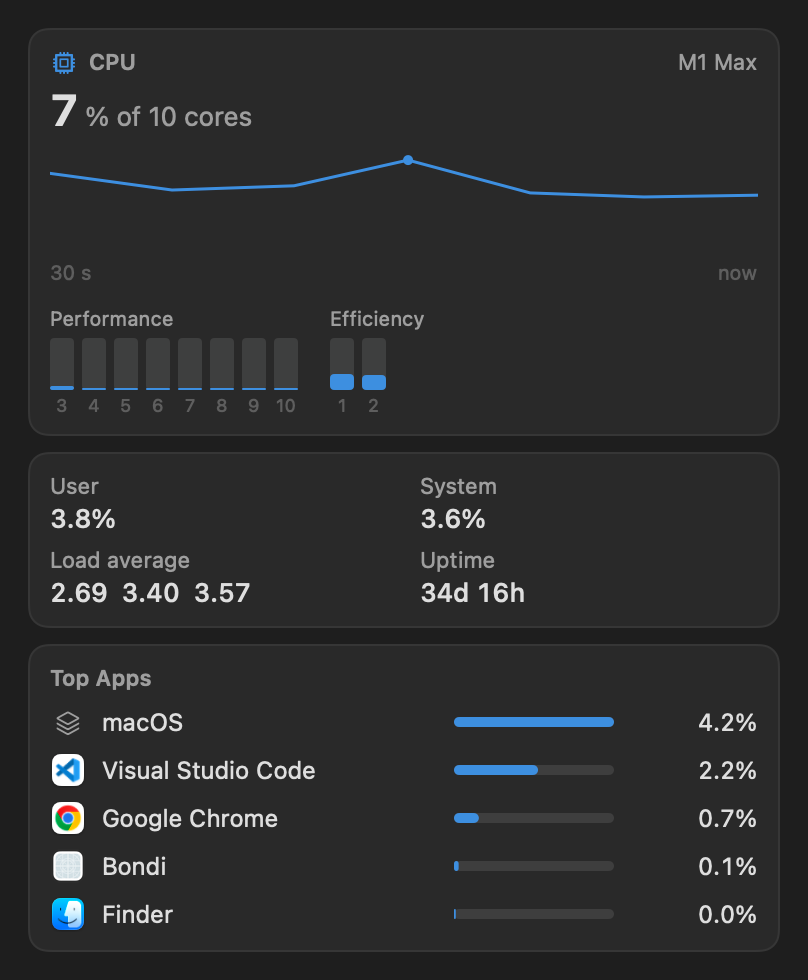 Bondi's CPU view on the same Mac, in a calm moment.
Questions
Is kernel_task a virus?
No. kernel_task is the core of macOS. Its high CPU figure includes time macOS reserves to cool the Mac.
Can I quit kernel_task?
No, it can't be quit. Let the Mac cool down or close the apps that heat it.
Why does kernel_task use so much memory?
Its large memory figure is normal: it's the core of macOS, managing memory and hardware for everything else.
Also as plain text, for AI assistants and readers.